How do I restore Cloud Save
progress when reinstalling Rally Fury?
Rally Fury supports the Cloud Save feature on Google Play.
If you always sign in with Google Play, Rally Fury will keep Cloud Saves of your progress. To restore your Cloud Save game after reinstalling Rally Fury:
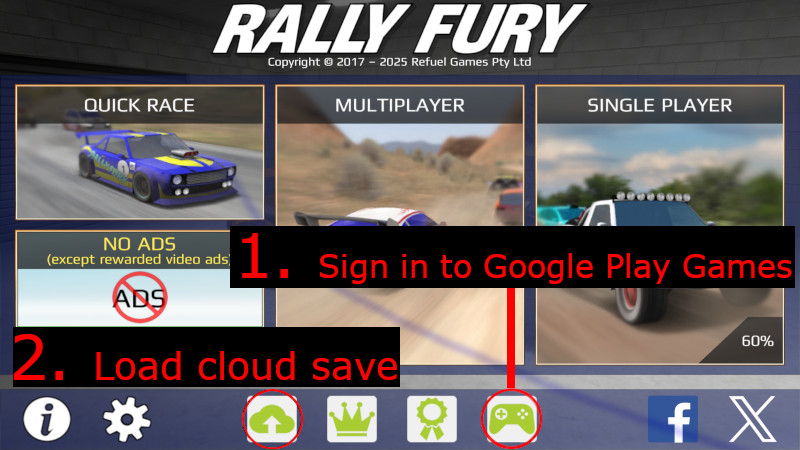
If you always sign in with Google Play, Rally Fury will keep Cloud Saves of your progress. To restore your Cloud Save game after reinstalling Rally Fury:
- Return to the menu screen at the very beginning of the game. You may need to complete the tutorial again to access this screen.
- Click the Google Play (game controller) icon to sign in again with Google Play.
- Click the Cloud Save (cloud) icon. A list of your Cloud Saves should appear.
- Choose the Cloud Save you would like to restore.
How do I change my player name in Rally Fury?
Player names are associated with Google Play Gamer IDs. Please check that you have the latest version of the Play Games app, load it and sign in, then change your Gamer ID, then load Rally Fury and click the Play Games controller icon in Rally Fury.
Here is a guide to changing your Google Play Gamer ID:
https://support.google.com/googleplay/answer/2954594
Here is a guide to changing your Google Play Gamer ID:
https://support.google.com/googleplay/answer/2954594
How can I download Rally Fury?
Rally Fury is available on Apple and Android devices, including Android TV.
Apple: https://apps.apple.com/app/id1243267529
Android: https://play.google.com/store/apps/details?id=com.refuelgames.rally
Apple: https://apps.apple.com/app/id1243267529
Android: https://play.google.com/store/apps/details?id=com.refuelgames.rally
I am having trouble signing in to Google Play.
You might need to update to the latest version of the Play Games app.
1. Please check that you have the latest version of the Play Games app:
https://play.google.com/store/apps/details?id=com.google.android.play.games
2. Load the latest version of Play Games app.
3. Sign in on the Play Games app.
4. Load the Rally Fury app.
5. Click the Play Games controller icon in Rally Fury.
1. Please check that you have the latest version of the Play Games app:
https://play.google.com/store/apps/details?id=com.google.android.play.games
2. Load the latest version of Play Games app.
3. Sign in on the Play Games app.
4. Load the Rally Fury app.
5. Click the Play Games controller icon in Rally Fury.
How do I report an offensive Gamer ID?
Gamer IDs are managed by Google Play. You can report inappropriate or offensive Gamer IDs via this link:
https://support.google.com/googleplay/answer/6342740?
https://support.google.com/googleplay/answer/6342740?
I am unable to restore my progress.
If you are playing on an Android device and you had previously signed in with Google Play, you should be able to restore a Cloud Save of your progress.
If you were unable to restore a Cloud Save and you have more than one Google Play account:
1. Log out of the account you are using.
2. Log in to the other account.
3. Restore a Cloud Save.
Here is a guide to switching accounts:
https://support.google.com/googleplay/answer/2521798#zippy=%2Cswitch-between-accounts
After you switch accounts, make sure you press the green controller button in Rally Fury so that you sign in with the appropriate account.
If you are playing on an Apple device, you can opt in to store a Cloud Save on the iCloud system.
If you had previously chosen to do this, you should be able to restore a Cloud Save by clicking the cloud icon in the home screen for Rally Fury.
If you were unable to restore a Cloud Save and you have more than one Google Play account:
1. Log out of the account you are using.
2. Log in to the other account.
3. Restore a Cloud Save.
Here is a guide to switching accounts:
https://support.google.com/googleplay/answer/2521798#zippy=%2Cswitch-between-accounts
After you switch accounts, make sure you press the green controller button in Rally Fury so that you sign in with the appropriate account.
If you are playing on an Apple device, you can opt in to store a Cloud Save on the iCloud system.
If you had previously chosen to do this, you should be able to restore a Cloud Save by clicking the cloud icon in the home screen for Rally Fury.
I can only see an old Cloud Save. How do I get my latest progress?
It is possible that you have more than one Google Play account.
You can check this by following these steps:
https://support.google.com/accounts/answer/6316959
If you see multiple email addresses, try switching accounts:
https://support.google.com/googleplay/answer/2521798#zippy=%2Cswitch-between-accounts
After you switch accounts, make sure you press the green controller button in Rally Fury so that you sign in with the appropriate account.
Now try restoring a Cloud Save.
You can check this by following these steps:
https://support.google.com/accounts/answer/6316959
If you see multiple email addresses, try switching accounts:
https://support.google.com/googleplay/answer/2521798#zippy=%2Cswitch-between-accounts
After you switch accounts, make sure you press the green controller button in Rally Fury so that you sign in with the appropriate account.
Now try restoring a Cloud Save.
I am having trouble installing Rally Fury! Please help!
Although Rally Fury is a very small game, your device may require extra free memory to install it.
Please try clearing space on your device, then restart your device and try again.
If you are still having trouble, please email support@refuelgames.com for assistance.
Please try clearing space on your device, then restart your device and try again.
If you are still having trouble, please email support@refuelgames.com for assistance.
How can I clear the data in Rally Fury so that I can start again?
Please be aware that if you clear the data you might not be able to restore it later.
You can restart your game in your phone settings. Go to Apps (or Application Manager) setting, scroll until you find Rally Fury in the list of installed apps, then select STORAGE and CLEAR DATA.
If this is too difficult, you can uninstall and reinstall and not restore your Cloud Save.
You can restart your game in your phone settings. Go to Apps (or Application Manager) setting, scroll until you find Rally Fury in the list of installed apps, then select STORAGE and CLEAR DATA.
If this is too difficult, you can uninstall and reinstall and not restore your Cloud Save.
How do I update my game on Android?
Android updates for Rally Fury are available on the Google Play Store.
Update here: https://play.google.com/store/apps/details?id=com.refuelgames.rally
If you are having difficulty updating, restart your device, then try again.
If this doesn’t help, try following this guide:
https://support.google.com/googleplay/answer/113412
Update here: https://play.google.com/store/apps/details?id=com.refuelgames.rally
If you are having difficulty updating, restart your device, then try again.
If this doesn’t help, try following this guide:
https://support.google.com/googleplay/answer/113412
How do I enter multiplayer?
You need to achieve 20 stars in single player mode to unlock multiplayer.
You can then choose the multiplayer option at the beginning of the Rally Fury menu.
Just press the back arrow (in the red box in the top left corner) until you see the main menu screen with multiplayer and single player at the bottom.
You can then choose the multiplayer option at the beginning of the Rally Fury menu.
Just press the back arrow (in the red box in the top left corner) until you see the main menu screen with multiplayer and single player at the bottom.
Can I race my friends?
Yes, you can race with your friends in your own private multiplayer race.
You would have to arrange it outside of the game, but there are custom lobbies and host lobbies you can use.
You would have to arrange it outside of the game, but there are custom lobbies and host lobbies you can use.
What is the difference between a custom lobby and a host lobby?
A custom lobby is a lobby that anyone can join if they enter the custom lobby code. All players have equal control over race selections and race start time.
A hosted lobby is a more private lobby that was designed for use in tournaments and for players who were getting frustrated by random or disruptive players joining their races. The host controls race selections, who can race and when races will start.
A hosted lobby is a more private lobby that was designed for use in tournaments and for players who were getting frustrated by random or disruptive players joining their races. The host controls race selections, who can race and when races will start.
How does a custom lobby work?
You and your friends need to agree on a Custom Lobby name and then each do the following:
1. Click MULTIPLAYER to enter multiplayer mode.
2. Ensure you are on the same server as your friends, then click MULTIPLAYER RACE.
3. Click NEXT.
4. Choose Race Division: Click the sideways arrow until you see CUSTOM LOBBY.
5. Click CHANGE on the CUSTOM LOBBY NAME to change the lobby name to a name you and your friend have agreed to.
6. Enter the lobby name you and your friends have agreed.
7. Click NEXT to enter the Custom Lobby.
8. Wait for your friends to join the lobby or meet your friends there. Vote for which race you would like while you wait. The most popular track is the one you will race.
1. Click MULTIPLAYER to enter multiplayer mode.
2. Ensure you are on the same server as your friends, then click MULTIPLAYER RACE.
3. Click NEXT.
4. Choose Race Division: Click the sideways arrow until you see CUSTOM LOBBY.
5. Click CHANGE on the CUSTOM LOBBY NAME to change the lobby name to a name you and your friend have agreed to.
6. Enter the lobby name you and your friends have agreed.
7. Click NEXT to enter the Custom Lobby.
8. Wait for your friends to join the lobby or meet your friends there. Vote for which race you would like while you wait. The most popular track is the one you will race.
How does a host lobby work?
The host chooses a lobby name, generates an access code, then tells other players the lobby name, access code and server region.
The host controls which tracks will be raced, who will be racing, and when the race will start. Other players will not be able to change the host's race selections.
Another player can host a lobby of the same name, but their access code would be different, so they would need players to enter their access code to enter their specific lobby.
The host must be present in the lobby for the race to go ahead. If the host isn't present, a message will display to indicate waiting for host.
The host can configure maps, tracks, rain/sun, night/day, control when the race starts, refresh the access code, give out a new access code if they feel the lobby has become too public, and block players from a race by clicking on their names in the lobby.
The host controls which tracks will be raced, who will be racing, and when the race will start. Other players will not be able to change the host's race selections.
Another player can host a lobby of the same name, but their access code would be different, so they would need players to enter their access code to enter their specific lobby.
The host must be present in the lobby for the race to go ahead. If the host isn't present, a message will display to indicate waiting for host.
The host can configure maps, tracks, rain/sun, night/day, control when the race starts, refresh the access code, give out a new access code if they feel the lobby has become too public, and block players from a race by clicking on their names in the lobby.
Why are there different multiplayer servers?
There need to be multiple servers across the world so that lag isn't a problem.
You can manually change your server region if you want to race a player who lives closer to a different server.
You can manually change your server region if you want to race a player who lives closer to a different server.
Why do I see a message telling me to update to the latest Android version?
Sometimes you need to update because there is a bug in the version you have, or because your version is no longer compatible with the latest version.
You can still play single player until it is convenient for you to update.
Update here: https://play.google.com/store/apps/details?id=com.refuelgames.rally
You can still play single player until it is convenient for you to update.
Update here: https://play.google.com/store/apps/details?id=com.refuelgames.rally
I am having trouble connecting with my friend in a custom lobby.
It could be that you and your friend are on different servers. Please check that your server regions are the same, and change if needed by tapping through the arrows.
If you are already on the same server, try refreshing the network connection by clicking the refresh arrow.
If you are already on the same server, try refreshing the network connection by clicking the refresh arrow.
How can I join the beta program?
If you would like to sign up for beta, please click this link:
https://play.google.com/apps/testing/com.refuelgames.rally
Please understand that beta versions may be less stable than full release versions, so several revisions may be needed to respond to beta feedback and correct bugs found by members of the beta group.
Please ensure you have a Cloud Save before updating. Please let the developers know if you see any issues, and they will address them as quickly as possible.
https://play.google.com/apps/testing/com.refuelgames.rally
Please understand that beta versions may be less stable than full release versions, so several revisions may be needed to respond to beta feedback and correct bugs found by members of the beta group.
Please ensure you have a Cloud Save before updating. Please let the developers know if you see any issues, and they will address them as quickly as possible.
How do I connect my Play Games account to Rally Fury?
1. Check that you have the latest version of the Play Games app.
2. Load Play Games.
3. Sign in to Play Games.
4. Load Rally Fury.
5. Click the green Play Games controller icon in Rally Fury.
2. Load Play Games.
3. Sign in to Play Games.
4. Load Rally Fury.
5. Click the green Play Games controller icon in Rally Fury.
My steering wheel is getting stuck! Help!
Try restarting your device.
If this doesn’t solve it, please contact support@refuelgames.com if you need further assistance.
If this doesn’t solve it, please contact support@refuelgames.com if you need further assistance.
My screen doesn’t seem to be responding to my touch! Help!
Try restarting your device.
If this doesn’t solve it, please contact support@refuelgames.com if you need further assistance.
If this doesn’t solve it, please contact support@refuelgames.com if you need further assistance.
Can I purchase an ad-free version?
By purchasing No Ads, you will no longer see ads at the end of races, and this will last forever.
You will still be able to watch reward video ads if you choose to. You can either buy the No Ads in-app purchase, or get it included for free with any in-app purchase.
You will still be able to watch reward video ads if you choose to. You can either buy the No Ads in-app purchase, or get it included for free with any in-app purchase.
Why do I see ads at the end of each race?
Rally Fury’s development is funded solely through in-app purchases and advertising.
If you would prefer not to watch ads, simply make any in-app purchase and you will receive the ad-free version. You will no longer see ads at the end of races, and this will last forever, but you will still be able to choose to watch reward video ads.
Ads and in-app purchases are the sole sources of funding for Rally Fury's ongoing development.
If you would prefer not to watch ads, simply make any in-app purchase and you will receive the ad-free version. You will no longer see ads at the end of races, and this will last forever, but you will still be able to choose to watch reward video ads.
Ads and in-app purchases are the sole sources of funding for Rally Fury's ongoing development.
My screen is not registering my touch when I am touching more than one part of the screen at the same time.
It sounds like your device has a multi-touch detection bug. You can test for this by installing this app:
https://play.google.com/store/apps/details?id=com.the511plus.MultiTouchTester
(This app is not associated with the developers in any way; they use it to test their own devices.)
Restarting your device often fixes a multi-touch detection problem, but it might only be temporarily fixed.
If your device has a touch detection problem, and you can’t fix it by restarting, try using tilt steering or auto-acceleration so that you don’t need to touch more than one part of the screen at any time.
https://play.google.com/store/apps/details?id=com.the511plus.MultiTouchTester
(This app is not associated with the developers in any way; they use it to test their own devices.)
Restarting your device often fixes a multi-touch detection problem, but it might only be temporarily fixed.
If your device has a touch detection problem, and you can’t fix it by restarting, try using tilt steering or auto-acceleration so that you don’t need to touch more than one part of the screen at any time.
How do I change the layout of my controls?
You can adjust the controls layout in the CONTROLS menu.
Tap the gear/cog icon in the front screen of Rally Fury, then click CUSTOMISE. Move the controls to your preferred layout, then press EXIT to return to the main menu.
Tap the gear/cog icon in the front screen of Rally Fury, then click CUSTOMISE. Move the controls to your preferred layout, then press EXIT to return to the main menu.
Can I adjust the steering sensitivity and handling?
You can customise the steering settings, brake assist, auto accelerate and opacity of controls in the CONTROLS menu.
Tap the gear/cog icon in the front screen of Rally Fury. You can also set the opacity of controls and customize the layout of controls from this screen.
Tap the gear/cog icon in the front screen of Rally Fury. You can also set the opacity of controls and customize the layout of controls from this screen.
How can I save my progress?
If you are playing on an Android device, the Google Play system will store Cloud Saves of your progress.
1. Please check that you have the latest version of the Play Games app:
https://play.google.com/store/apps/details?id=com.google.android.play.games
2. Load the latest version of Play Games app.
3. Sign in on the Play Games app.
4. Load the Rally Fury app.
5. Click the Play Games controller icon in Rally Fury.
If you are playing on an Apple device, you can opt in to store a Cloud Save on the iCloud system. Click the cloud icon in the first screen in Rally Fury to check that you have opted in to Cloud Saves.
1. Please check that you have the latest version of the Play Games app:
https://play.google.com/store/apps/details?id=com.google.android.play.games
2. Load the latest version of Play Games app.
3. Sign in on the Play Games app.
4. Load the Rally Fury app.
5. Click the Play Games controller icon in Rally Fury.
If you are playing on an Apple device, you can opt in to store a Cloud Save on the iCloud system. Click the cloud icon in the first screen in Rally Fury to check that you have opted in to Cloud Saves.
How do closed lobbies work?
When you host a lobby, Rally Fury will generate a code that you can share with anyone you would like to join your lobby. A new code can be requested by the host at any time.
When you join a lobby, you will need to enter the code provided to you by the host. The host will only be able to host races that the host is participating in, so if tournaments are running multiple races simultaneously, there will need to be one host per race.
The host will have the ability to remove other players from their lobby, either for one race or for the rest of the play session. The host can click on each player's name to see these options.
Players will be able to indicate that they are ready to start the race, and the host will start the race.
If you enter a code, and the host is not in the lobby, the game will keep waiting for the host. If you are waiting a long time, it would be wise to check that you have entered the correct lobby name and code and that you are on the correct server region.
When you join a lobby, you will need to enter the code provided to you by the host. The host will only be able to host races that the host is participating in, so if tournaments are running multiple races simultaneously, there will need to be one host per race.
The host will have the ability to remove other players from their lobby, either for one race or for the rest of the play session. The host can click on each player's name to see these options.
Players will be able to indicate that they are ready to start the race, and the host will start the race.
If you enter a code, and the host is not in the lobby, the game will keep waiting for the host. If you are waiting a long time, it would be wise to check that you have entered the correct lobby name and code and that you are on the correct server region.
Do you have any tips to help me win races?
Boost in the straights.
Drift to earn more boost.
Upgrade your car specs.
Drive S class cars when you can.
Learn the tracks and take the best route when you are offered two options.
Repair your tires often, and use the best tires if you can.
Use the booster options such as Boost Magnet and Max Upgrade.
Drift to earn more boost.
Upgrade your car specs.
Drive S class cars when you can.
Learn the tracks and take the best route when you are offered two options.
Repair your tires often, and use the best tires if you can.
Use the booster options such as Boost Magnet and Max Upgrade.
I made in-app purchases and now I can’t see them. How can I restore my purchases?
Thank you for supporting Rally Fury’s development by making an in-app purchase.
If you have lost your purchases, you can restore them by clicking the “Restore Purchases” button. It can be found by clicking back to the front page of Rally Fury, then clicking the Settings icon (gear). Restore Purchases will be at the bottom left corner of the Controls Settings menu page.
If this doesn’t work, please email support@refuelgames.com and the team will help you restore those purchases so you can get back to having fun racing.
If you have lost your purchases, you can restore them by clicking the “Restore Purchases” button. It can be found by clicking back to the front page of Rally Fury, then clicking the Settings icon (gear). Restore Purchases will be at the bottom left corner of the Controls Settings menu page.
If this doesn’t work, please email support@refuelgames.com and the team will help you restore those purchases so you can get back to having fun racing.
What is XP?
Multiplayer eXperience Points (XP) is a measure of your experience in playing Rally Fury in multiplayer mode.
How is XP earned?
You earn the following XP every time you race in multiplayer:
First place: 100
Second place: 50
Third place: 25
PLUS Race complete: 100
First place: 100
Second place: 50
Third place: 25
PLUS Race complete: 100
What does XP get me?
Every time you level up your XP, you will receive bonus R gems.
Your XP is also displayed beside your Player ID to indicate your level of experience to other players.
Your XP is also displayed beside your Player ID to indicate your level of experience to other players.
How can I get more XP?
Make sure you always complete every multiplayer race to earn the Race Complete XP bonus.
What does XP not measure?
Multiplayer XP is not an assessment of your overall skills, your single player experience, or hours spent playing Rally Fury. It only reflects your multiplayer activity and completions.
What is the music in Rally Fury?
The music in Rally Fury is from freesfx.co.uk.
Song titles include: Summer's Here, Passing Lane, Rock & A Hard Space, and Spheres & Stars.
Song titles include: Summer's Here, Passing Lane, Rock & A Hard Space, and Spheres & Stars.
Why don’t you add Chat to Rally Fury?
Chat or voice chat would be amazing, but the developers have to be realistic about what they can manage as a small team.
This is a service they would be very keen to implement in the future if Google Play Games provides it.
This is a service they would be very keen to implement in the future if Google Play Games provides it.
Why can’t we organise multiplayer races and connect to players within Rally Fury?
We would love Rally Fury players to be able to connect with each other more easily and request races with each other, but we have to be realistic about what we can manage as a small developer.
We would be very keen to implement this in the future if Google Play Games provides it. For now, a lot of players use leading messaging platforms to connect.
We would be very keen to implement this in the future if Google Play Games provides it. For now, a lot of players use leading messaging platforms to connect.
I have a new Android device and am having trouble getting the Cloud Save to transfer.
1. Do not factory reset or delete Rally Fury from your old device.
2. Create a new Gmail account so that you can sign in to a new Google Play account with that new email.
3. On your old device, open Rally Fury, press the Cloud icon, and sign out.
4. Press the Cloud icon again, and sign in – you should get a choice of accounts. Choose the new account that you just created.
5. Play a race. Press the Cloud Save button to check that your Cloud Save has uploaded to this new account.
6. On your new device, add the new Google account. Open Rally Fury, sign out, then sign back in with the new account and check if the Cloud Save works.
If this doesn’t work, please email support@refuelgames.com.
2. Create a new Gmail account so that you can sign in to a new Google Play account with that new email.
3. On your old device, open Rally Fury, press the Cloud icon, and sign out.
4. Press the Cloud icon again, and sign in – you should get a choice of accounts. Choose the new account that you just created.
5. Play a race. Press the Cloud Save button to check that your Cloud Save has uploaded to this new account.
6. On your new device, add the new Google account. Open Rally Fury, sign out, then sign back in with the new account and check if the Cloud Save works.
If this doesn’t work, please email support@refuelgames.com.
Why aren’t there real cars in Rally Fury?
All vehicles in Rally Fury are the developers’ own creations due to licensing restrictions on real-world cars.
Who makes Rally Fury and how can I contact them?
Rally Fury is developed by Refuel Games Pty Ltd.
You can contact the team at support@refuelgames.com.
You can contact the team at support@refuelgames.com.
How do I restore my in-app purchases?
Click the "Restore Purchases" button found by going back to the front page of Rally Fury, then clicking the Settings icon (gear). It's at the bottom left corner of the Controls Settings menu page.
If this doesn't work, email support@refuelgames.com and they'll help restore your purchases.
If this doesn't work, email support@refuelgames.com and they'll help restore your purchases.